
Windrock Park
Windrock Properties, LLCTravel & Local
2.680.00 Reviews
- Version
- 2.0.3
- Installs
- 10.00K
- Age Rating
- Everyone
Screenshots
Our Review of Windrock Park
 Analysis by Appyee
If you’re planning your first visit to Windrock Park, the app is best approached as a park-specific companion rather than a general travel planner. I’d use it to get oriented, make decisions about where to ride, and keep the park’s trail information close at hand. That focus is useful once you’re on site, but it also means the app makes the most sense for someone already considering Windrock—not for choosing between destinations or navigating an entire road trip.
What to expect from a park-specific guide
Windrock Park is a free Travel & Local app from Windrock Properties, LLC. It has an Everyone age rating, and its latest version is 2.0.3. The app has attracted over ten thousand installs, while its 2.6 average from 106 ratings suggests a mixed reception. I’d treat that rating as a reason to arrive with a practical backup plan, not as proof that the app will fail for you. The useful test is whether its park-focused tools suit the way you intend to explore.
That distinction matters when comparing it with the usual alternatives. A general mapping app is more useful for driving to the area or finding places beyond the park, while a paper map can be a dependable overview that does not rely on a phone screen. Neither is automatically a replacement for a guide intended specifically for Windrock. I’d use the park app for local orientation and trail planning, then keep ordinary navigation available for the drive and a second reference for important decisions.
For a first visit, the strongest reason to install it is having park information in one place before you set out. It can help you think through whether a trail sounds suitable and how a day might fit together. The weaker reason is expecting any app to make unfamiliar off-road terrain effortless. A map can support a decision; it cannot judge your comfort, vehicle, changing conditions, or the choices of the people travelling with you.
Make the first setup part of the plan
I’d install the app while I still had reliable internet, open it before leaving home, and take a little time to understand the map and its controls. That simple preparation is more useful than waiting until you reach the trailhead and trying to learn the interface in a hurry. If you plan to depend on downloaded maps, check that the relevant material is available on your phone before setting off; don’t assume an offline option will help unless you have prepared it in advance.
Next, agree on a basic plan with everyone in your group. Decide what kind of outing you want, who is comfortable with more challenging terrain, and when you’ll pause to reassess. The app can inform your choices, but it shouldn’t be the only place your group keeps its plan. A charged phone, a clear meeting point, and a shared understanding of what to do if people become separated are sensible complements to digital guidance.
For a realistic first-day workflow, I’d check the map before breakfast, pick a manageable starting area, and discuss the route before anyone is driving or riding. Once you arrive, I’d confirm that the screen is behaving as expected and that the map is usable in the conditions you face. This creates a small but meaningful first success: everyone knows where they are beginning and can make the next decision together, rather than relying on one person to improvise.
Exploring the Features
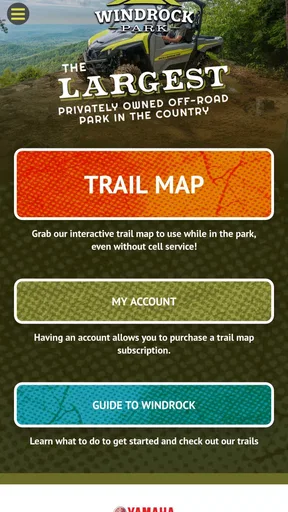
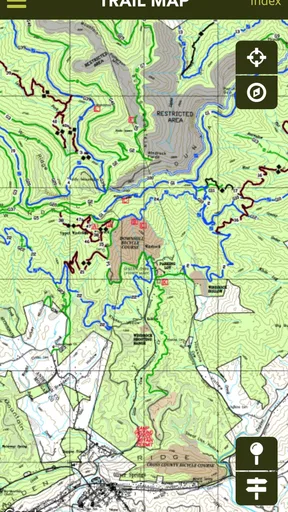
When you first dive into the Windrock Park app, you'll notice its clean and user-friendly interface. It's incredibly intuitive, so you won't be fumbling around trying to find your way. The app's main feature is its detailed map of the park, which is essential for anyone planning to explore the vast 73,000 acres of trails.
The interactive map is a standout, giving you a bird’s eye view of the entire park. It's color-coded to help you easily differentiate between the various types of trails—be it ATV, 4x4, or hiking. You can even get real-time updates on trail conditions and closures, which is a game-changer when you're out in the wild.
Planning Your Adventure
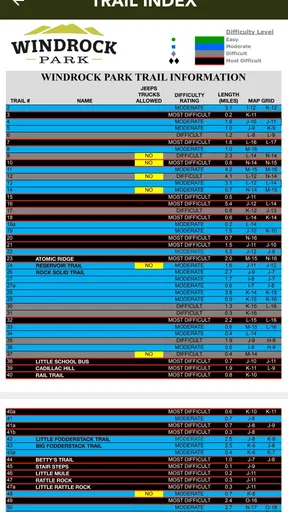
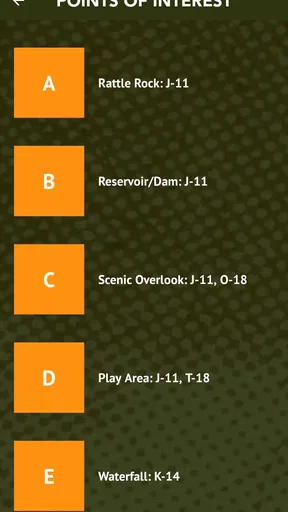
Before you hit the trails, you can use the app to plan your route. It provides detailed information on each trail, including its length, difficulty level, and any unique features or landmarks you might encounter. This is a lifesaver for beginners who might be a bit unsure about where to start.
For those who want to make a weekend out of it, the app also provides info on the park’s camping facilities. You can check availability and even book your spot right through the app. Talk about convenience!
Use the map as a decision aid
One useful habit is to choose a route with a clear stopping point rather than treating a trail list as a challenge to complete. Trail details can help you compare options, but the practical choice depends on the people in your group and how the day is going. If someone is new to off-roading, I’d make the first outing about learning the area and communicating well, not about proving how far the group can go.
For a mixed group, the map’s distinction between ATV, 4x4, and hiking trails is particularly helpful when talking through plans. It gives people a shared reference before they split up or choose different activities. I’d still make sure everyone understands the plan in ordinary terms—where you intend to start and how you’ll regroup—rather than assuming that looking at the same screen means everyone has the same picture in mind.
Camping information can also shape a longer visit, but I’d separate inspiration from logistics. Use the app to explore the possibility of staying over, then check the details that matter to your plans before you rely on a booking. In-app purchases range from $9.99 to $19.99 per item, so I’d review any purchase screen carefully and confirm what an item includes before paying. The app itself is free to install; that does not mean every optional item or service is free.
Community and Connectivity
One of the coolest features of the Windrock Park app is its community aspect. You can connect with other adventurers, share your experiences, and even join group rides. It's like having a social media platform specifically for off-road enthusiasts.
Plus, the app's connectivity features allow you to stay updated with the latest events, promotions, and news from the park. Whether it’s a special off-road race or a new trail opening, you’ll be in the loop.
Where expectations need a little care
Community features are most useful when they help you prepare or find people with compatible plans; I wouldn’t treat them as a substitute for a direct agreement with your own group. If a ride depends on a particular meeting time or route, confirm those details with the people involved instead of assuming a post or update will reach everyone. For a solo visitor, park news may still be handy, but the social side is less of a reason to install the app.
Likewise, trail condition information is valuable as a prompt to reconsider a plan, not a guarantee that every section will feel as expected when you arrive. Conditions can change, and a route’s difficulty description cannot account for every rider’s experience or every vehicle. If something feels beyond your comfort level, turning back is a better decision than letting a planned route dictate the day.
People sometimes wonder whether this can be their only navigation tool. I wouldn’t make that assumption. The app is centered on Windrock Park, and its map is the reason to use it there; general-purpose navigation remains a better fit for getting to the park and handling the rest of a trip. Before relying on any digital map in a remote area, prepare it ahead of time and keep your group’s plan understandable without constant screen access.
The Experience
Using the app in real-time while you're out on the trails is a breeze. The GPS tracking ensures that you always know your location, reducing the chances of getting lost. I found myself feeling more confident and adventurous, knowing I had this digital guide right in my pocket.
The only hiccup I experienced was in areas with limited cell service, but the app's offline capabilities came to the rescue. Just remember to download the maps before you head out.
Keep a sensible backup
Even when a map and location display are working well, I’d avoid making the phone the group’s single point of failure. Signal can be weak in the places where a trail guide is most tempting to rely on, and a screen can be difficult to use while travelling. Downloading map material before leaving is a practical step, but I’d also keep the phone charged and make sure another person knows the intended route. Those habits make the app more useful without expecting it to solve every problem.
If the map does not load as expected, pause somewhere safe and work out the next move before continuing. Reopen the app or check the prepared backup rather than guessing at a junction. That advice is not a knock on this particular guide; it’s the kind of caution I’d apply to any phone-based navigation in an unfamiliar off-road area.
Who will get the most from it
I’d recommend trying Windrock Park if you are visiting the park, want a park-oriented map, and like to plan a route before heading out. It is also a sensible starting point for a beginner who wants trail information to support a conversation with more experienced companions. The app is less compelling if you only need directions to the area, prefer paper maps, or are looking for a broad travel guide that covers several destinations.
It may also frustrate people who expect every part of a day to happen inside one app. A park-specific tool has a narrower job than a general map, and optional paid items mean it’s worth checking what you need before committing to an in-app purchase. The free download makes it easy to inspect the experience, but I’d base a purchase on a specific need rather than assuming extra spending is necessary for every visitor.
Final Thoughts
All in all, the Windrock Park app is a must-have for anyone planning to explore the park. Whether you're a seasoned off-roader or a newbie looking for some excitement, this app provides everything you need to make your adventure safe and unforgettable.
So, if you're ready to take on the trails and embrace the thrill of the outdoors, this app is your ticket to an incredible experience. Just download it, pack your gear, and get ready for an adventure like no other!
My more measured recommendation is to treat it as a useful part of preparation, not as a promise that every outing will be simple. The app is free, has an Everyone rating, and runs on devices with Android 7.0 or later. Its latest version is 2.0.3, but I’d still test it before travel and keep another way to orient yourself. If its park map and planning tools match your visit, it can make the first decisions feel less daunting; if you need a complete travel navigator, a broader mapping option is the better companion.
Verdict
Strengths of Windrock Park
- User-friendly interface for easy navigation.
- Comprehensive trail maps with GPS support.
- Real-time weather updates for safety.
- Offline access to maps when needed.
- Community forums for sharing experiences.
Limitations of Windrock Park
- Limited free features; subscription needed.
- Occasional GPS accuracy issues.
- Requires a stable internet connection.
- Battery drain due to constant GPS use.
- No night mode for low-light conditions.
Similar Picks in This Category
View All
Google Maps
Google LLC3.4

Google Maps Go
Google LLC4.1

Booking.com: Hotels & Travel
Booking.com Hotels & Vacation Rentals4.8

Google Earth
Google LLC3.8

Skyscanner Flights Hotels Cars
Skyscanner Ltd4.8

trivago: Compare hotel prices
trivago N.V.4.4
Frequently Asked Questions
What is Windrock Park and what features does it offer?
Windrock Park is an outdoor adventure app that allows users to explore a vast terrain of trails for off-roading, hiking, and mountain biking. The app provides detailed maps, trail difficulty ratings, GPS tracking, and updates on weather conditions. It's an ideal tool for planning your next outdoor adventure at Windrock Park.
Is Windrock Park app available for both Android and iOS devices?
Yes, the Windrock Park app is available for both Android and iOS platforms. Users can download it from the Google Play Store for Android devices or the Apple App Store for iOS devices. The app ensures a seamless experience across different devices, making it easy to plan and enjoy your outdoor activities.
Do I need an internet connection to use the Windrock Park app?
While an internet connection is required to initially download the app and access the latest updates, Windrock Park also offers offline capabilities. Users can download trail maps and important information beforehand, allowing them to use the app even in areas with limited or no internet connectivity.
Does the Windrock Park app require a subscription or any in-app purchases?
The Windrock Park app may offer free basic features, but it also includes premium features that can be accessed via a subscription or one-time purchase. These features might include advanced trail analytics, exclusive trail access, or enhanced GPS functionalities. Details on pricing and subscriptions are available within the app.
How accurate and reliable is the trail information on Windrock Park?
The Windrock Park app is designed to provide reliable and up-to-date trail information. It includes user-generated content and official updates from park authorities. However, users are encouraged to check for real-time updates and use their judgment when navigating trails, as conditions can change due to weather or maintenance.
